
2. Give it tools
In Module 1 the model invented sessions. It has no idea what’s on the Lumen AI Summit schedule. The fix is to let it ask your code for the facts. That’s what tool calling is.
How tool calling works
Section titled “How tool calling works”The model never runs your code. It can only ask you to run something. You run it and send back the result.
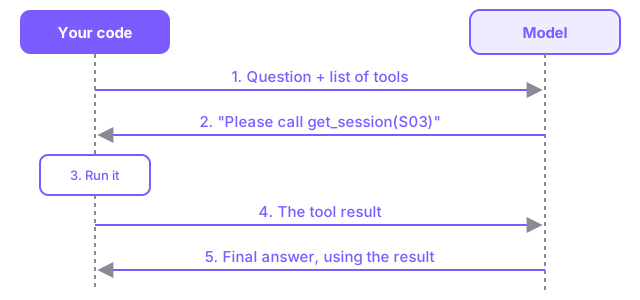
Describing a tool
Section titled “Describing a tool”You describe each tool with a name, a description and a JSON Schema for its parameters. The model reads the description to decide when to use the tool, so write it like documentation for a new teammate.
{ "type": "function", "function": { "name": "list_sessions", "description": "List conference sessions. All filters are optional.", "parameters": { "type": "object", "properties": { "day": {"type": "string", "description": "'Day 1' or 'Day 2'"}, "level": {"type": "string", "description": "Beginner, Intermediate or Advanced"}, }, "required": [], }, },}The Python functions behind the tools are already written in code/agentlab/tools.py. Open it and take a look: list_sessions, get_session and friends just read from JSON files in agentlab/data/.
Exercise
Section titled “Exercise”Open code/02-tools/starter/agent.py.
TODO 1: add a schema for get_session. It takes one required string parameter, session_id.
{ "type": "function", "function": { "name": "get_session", "description": "Get full details for one session, including the abstract.", "parameters": { "type": "object", "properties": { "session_id": {"type": "string", "description": "Session id such as 'S03'"}, }, "required": ["session_id"], }, }, },TODO 2: when the model asks for tools, run each one and add the result to the conversation as a tool message. The tool_call_id tells the model which request this result answers.
messages.append(reply) for call in reply["tool_calls"]: name = call["function"]["name"] arguments = call["function"]["arguments"] result = tools.execute(name, arguments) messages.append({"role": "tool", "tool_call_id": call["id"], "content": result})tools.execute parses the arguments (the model sends them as a JSON string), calls the Python function and returns the result as JSON.
From here on, the code uses llm.chat() from agentlab/llm.py instead of calling httpx directly. Open it: it’s the same POST you wrote in Module 1, plus error handling and the tools parameter.
Run it:
python 02-tools/starter/agent.pyTry these and watch the [tool] lines:
Which beginner sessions are on Day 1?Who is speaking in S03?Is there anything about testing AI apps?
Where it breaks
Section titled “Where it breaks”Now try: Tell me more about the advanced sessions on Day 2.
The model often needs two steps: list the sessions, then get details. Our code allows only one round of tool calls, so you’ll see “The model wanted to call another tool.” One round isn’t enough. Next you’ll fix this with a loop, and that loop is what makes it an agent.
Try this
Section titled “Try this”- Make the
get_sessiondescription vague (for example,"Session tool"). Does the model still use it correctly? - Print
messagesat the end ofanswer()to see the full conversation, including tool calls and results.
Checkpoint. You can describe tools with JSON schemas, run the calls a model asks for and send the results back. The model now answers from real data instead of guessing.
Stuck? Run python 02-tools/solution/agent.py