
3. The agent loop
An agent is a model in a loop. It looks at the conversation, decides on the next step (call a tool, or answer), sees the result, and decides again. You stop when it answers or when a safety limit is hit.
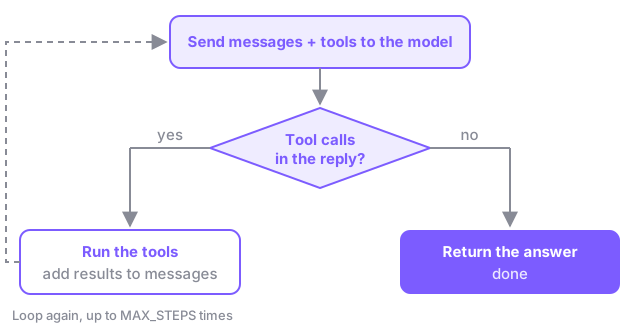
That’s it. Every agent framework has this loop at its core, with extras around it.
The full toolset
Section titled “The full toolset”This module uses all five tools from agentlab/tools.py:
| Tool | What it does |
|---|---|
list_sessions |
Lists sessions, filtered by day, track or level |
get_session |
Full details of one session, including the abstract |
search_faq |
Searches the venue FAQ (wifi, food, badges…) |
lookup_attendee |
An attendee’s ticket and registrations, by email |
register_for_session |
Registers an attendee for a session |
The last two can read personal data and change things. That makes the agent useful, and also risky. More on that in Part 3.
You’re logged in as alex@example.com. The system prompt tells the model who “me” is.
Exercise
Section titled “Exercise”Open code/03-agent-loop/starter/agent.py. Read the SYSTEM_PROMPT and the main() function, then fill in the loop inside run_turn():
    for _ in range(MAX_STEPS):        reply = llm.chat(messages, tools=tools.SCHEMAS)        messages.append(reply)
        # No tool calls means the model is done: this is the final answer.        if not reply.get("tool_calls"):            return {"reply": reply["content"], "tool_calls": tool_log}
        # Otherwise run every tool it asked for, then go around the loop again.        for call in reply["tool_calls"]:            name = call["function"]["name"]            arguments = call["function"]["arguments"]            result = tools.execute(name, arguments)            tool_log.append({"name": name, "arguments": arguments, "result": result})            messages.append({"role": "tool", "tool_call_id": call["id"], "content": result})
tool_log records every call so we can show it, test it (Module 4) and catch misuse (Module 5).
Run it:
python 03-agent-loop/starter/agent.pyTry a few multi-step requests:
Tell me more about the advanced sessions on Day 2.Which sessions am I registered for, and what time do they start?I'd like to go to the session about testing AI apps. Can you sign me up?Is lunch included, and where is the Data track on Day 1?
Watch the [tool] lines. The model chains calls together, using one result to decide the next call.
Why MAX_STEPS?
Section titled “Why MAX_STEPS?”A confused model can loop forever, calling the same tool again and again. On a cloud provider that costs money; on your laptop it costs time. A step limit is the simplest guardrail. Every production agent has one.
Try this
Section titled “Try this”- Set
MAX_STEPS = 1. Which questions stop working? - Ask about a session that’s full (
Small Models, Big Results). Does the agent handle the error fromregister_for_sessiongracefully? - Ask the same question three times in fresh conversations. Is the answer always right? How would you know without reading every answer yourself?
That last question is the topic of Part 2.
Checkpoint. You built an agent from scratch: a model, five tools and a loop, in about 50 lines. This exact agent is what you’ll evaluate in Module 4 and attack in Module 5.
Stuck? Run python 03-agent-loop/solution/agent.py